Saturday, 30 April 2016

What is SQL Server log shipping?

SQL Server log shipping is a technique which involves two or more SQL Server instances and copying of a transaction log file from one SQL Server instance to another. The process of transferring the transaction log files and restoring is automated across the SQL Servers. As the process result there are two copies of the data on two separate locations 

A log shipping session involves the following steps:
  • Backing up the transaction log file on the primary SQL Server instance
  • Copying the transaction log backup file across the network to one or more secondary SQL Server instances
  • Restoring the transaction log backup file on the secondary SQL Server instances

Implementation examples

One of the common log shipping scenarios is the environment with two servers (SQLServer-1 – primary and SQLServer-2 – secondary), two SQL Server instances (SQLInstance-1 and SQLInstance-2), and one SQL Server database named SQLDB-1 with log shipping running on it
Common SQL Server log shipping scenarios - the environment with two servers
Another common configuration is the environment with three (or more) servers (SQLServer-1 – primary, SQLServer-2 – secondary, and SQLServer-3 – secondary), three SQL Server instances (SQLInstance-1, SQLInstance-2, and SQLInstance-3), and one SQL Server database named SQLDB-1 with log shipping running on it
SQL Server Log shipping scenarios - The environment with three (or more) servers

Operating modes

There are two available modes and they are related to the state in which the secondary, log shipped, SQL Server database will be:
  • Standby mode – the database is available for querying and users can access it, but in read-only mode
    • The database is not available only while the restore process is running
      • Users can be forced to disconnect when the restore job commence
      • The restore job can be delayed until all users disconnect themselves
  • Restore mode – the database is not accessible

Advantages and disadvantages of using SQL Server log shipping

SQL Server log shipping is primarily used as a disaster recovery solution. Using SQL Server log shipping has multiple benefits: it’s reliable and tested in details, it’s relatively easy to set up and maintain, there is a possibility for failover between SQL Servers, data can be copied on more than one location etc.
Log shipping can be combined with other disaster recovery options such as AlwaysOn Availability Groups, database mirroring, and database replication. Also, SQL Server log shipping has low cost in human and server resources
The main disadvantages in the SQL Server log shipping technique are: need to manage all the databases separately, there isn’t possibility for an automatic failover, and secondary database isn’t fully readable while the restore process is running

Setting up the database log shipping environment

SQL Server log shipping is based on execution of predefined SQL Server jobs. The SQL Server log shipping feature is available in all SQL Server editions except the Express edition. All the databases intended to be used for log shipping must be in the Full or Bulk logged recovery model
Another important prerequisite is running SQL Server Agent on both servers. Security policies must be defined in order for SQL Server Agent to have permission to read and write in the backup folder. Note that SQL Server agent on the secondary server must be able to read from the primary server’s backup folder
The database backups can be compressed, but that requires additional CPU time. Most common configurations use network locations for storing the backups
The database log shipping setup needs to be initiated from the principal server using the SQL Server Management Studio wizard. The first step defines transaction log backup settings:
  • A network path to the backup
  • How long backup files should be kept before deleting
  • An alert if no backup is taken
  • The backup job itself
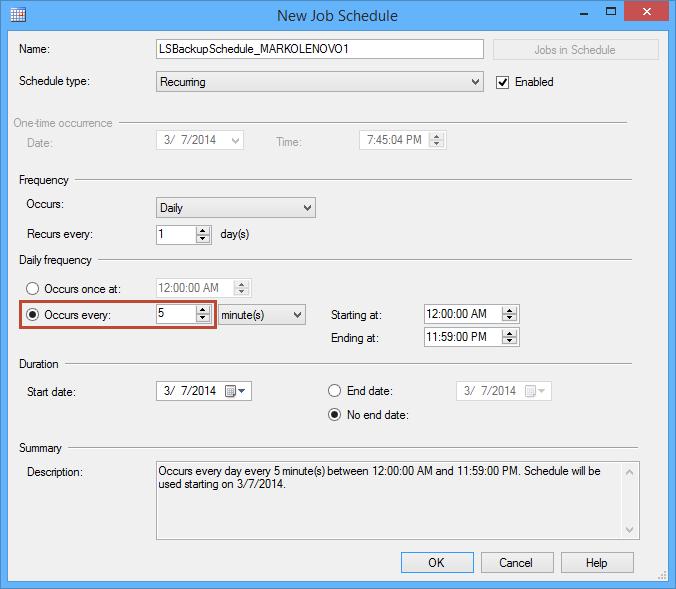
    • Schedule of the job
      • Schedule type
      • Frequency
      • Duration
SSMS wizard - New job schedule: backup job settings
The next step defines secondary databases which involve choosing the secondary SQL Server instance and secondary database. The full database backup, from the primary database, must be restored on the secondary server before log shipping commences
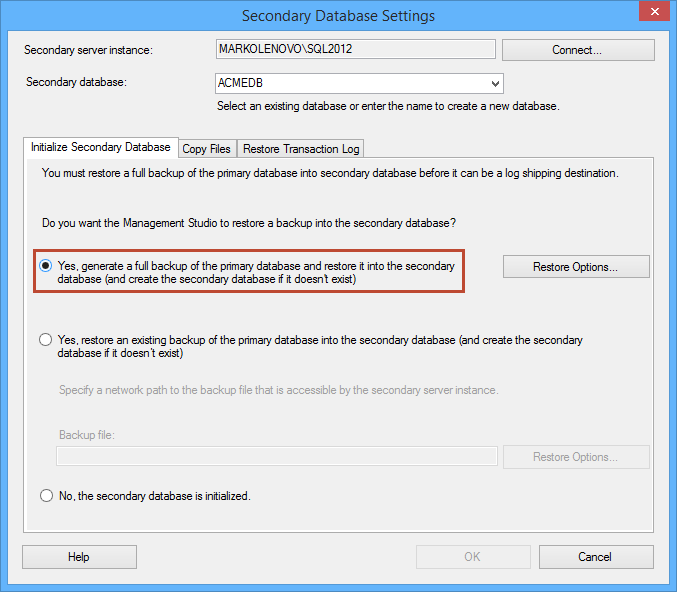
Secondary database settings dialog - choosing to generate a full backup
After initializing the secondary database you must define the copy folder where the transaction log backups from the primary server will be stored
The final step involves choosing from two available modes: The No recovery – Restore mode and Standby mode. You can also delay the restoring process and set up an alert if no restore occurs within the specified time
Secondary database settings dialog - choosing No recovery mode
Once the log shipping is ready for use, it will run in the background, and if the problem occurs the alert will signalize the problem
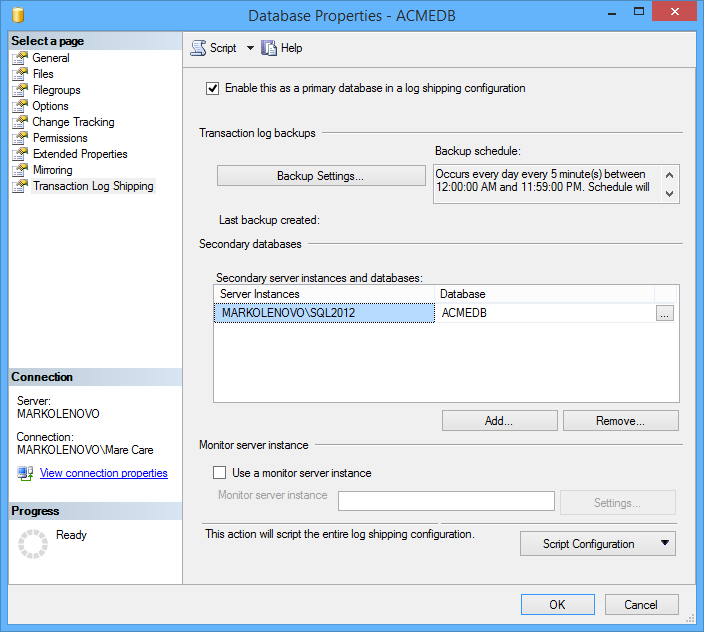
SQL Server log shipping is ready for use

Friday, 29 April 2016

Difference between Delegate and Events in C#?

Delegate:

A delegate in C# is similar to a function pointer in C. A delegate object holds the reference of one or more methods. Delegate creation is the four steps process.

  • Declaration of delegate
  • Delegate object creation
  • Point the reference to the method.
  • Invoke delegate

A delegate object doesn't care about the class in which the function exists. There is only one restriction that the delegate signature and the function signature should be same otherwise delegate object can’t hold the reference of the method which doesn't have the same signature. Signature means return type and parameters.

Example
public class Math
    {
        public static int Add(int i, int j)
        {
            return i + j;
        }
    }

    class DelegateAndEvent
    {
        //Delegate Declaration
        public delegate int MathFunctions(int i, int j);

        static void Main()
        {
            //Delegate object creation.
            MathFunctions MathFun = null;

            //Point the reference to the method.
            MathFun += Math.Add;

           // Invoke delegate.
            int value = MathFun.Invoke(10, 20);
            Console.WriteLine(value.ToString());

            Console.ReadLine();
        }
    }

Events:


Event is a mechanism by which a class can send notification to its client. For example, you have an application to perform certain operation, if an operation is failed then the application send the notification to log file, printer, fax, email etc. 

Events are declared using delegates. Without delegate, we can not create Events.

Example

    //subscriber class
    public class LogFileNotification
    {
        //Constructor 
        public LogFileNotification(Operatinos obj)
        {
            obj.SendNotification += WriteLog;           
        }

        private void WriteLog(string message)
        {
            //Write Log into a file
            Console.WriteLine("WriteLog :- " + message);
        }
    }

    //subscriber class
    public class PrinterNotification
    {
        //Constructor
        public PrinterNotification(Operatinos obj)
        {
            obj.SendNotification += PrintFailure;
        }

        private void PrintFailure(string message)
        {
           // Print the failure text. 
            Console.WriteLine("PrintFailure :- " + message);
        }
    }

    //subscriber class
    public class FaxNotification
    {
        //Constructor
        public FaxNotification(Operatinos obj)
        {
            obj.SendNotification += SendFax;
        }

        private void SendFax(string message)
        {
            // Send Fax to appropriate person.
            Console.WriteLine("SendFax :- " + message);
        }
    }

    //subscriber class
    public class EmailNotification
    {
        //Constructor
        public EmailNotification(Operatinos obj)
        {
            obj.SendNotification += SendEmail;
        }

        public void SendEmail(string message)
        {
            // Send email to appropriate person.
            Console.WriteLine("EmailNotification :- " + message);
        }
    }


    //Publisher class
    public class Operatinos
    {
        public delegate void Notification(string str);
        public event Notification SendNotification;
        LogFileNotification logFileNotification = null;
        PrinterNotification printerNotification = null;
        FaxNotification faxNotification = null;
        EmailNotification emailNotification = null;

       //Constructor
        public Operatinos()
        {
            logFileNotification = new LogFileNotification(this);
            printerNotification = new PrinterNotification(this);
            faxNotification = new FaxNotification(this);
            emailNotification = new EmailNotification(this);
        }

        public void OperationFailed()
        {
            SendNotification("Operation is failed.");
        }
    }

    public class MainClass
    {
        static void Main()
        {
            Operatinos op = new Operatinos();
            op.OperationFailed();

            Console.ReadLine();
        }
    }


Output

WriteLog :- Operation is failed.
PrintFailure :- Operation is failed.
SendFax :- Operation is failed.
EmailNotification :- Operation is failed.

The above example is based on publisher subscription model and we have achieved publisher subscription model through events. But the same things we can also achieved through delegate. Now the question comes, What is the main difference between Delegate and Events?

Main difference between Delegate and Events?

If we create a delegate into publisher class then subscriber has the authority todo the multiple operations on the delegate. It can invoke the delegate; can make the clone of the delegate and other operation also. See the below image.


But if we create Events into publisher class then subscriber class doesn't has any authority to do the operation. See the below image.


Friday, 22 April 2016

Question

What is difference between STUFF and REPLACE in SQL Server?

Answer

REPLACE is used to replace all the occurances of the given pattern in a string.
Example: select Replace('Nirav','N','R')
O/P: Rirav
STUFF: This function is used to replace the part of string with some other string.
syntax: STUFF (stringexpression, start, length, replacementcharacters)
Example:SELECT STUFF('Nirav''s Blog is USEFUL',9,4,'DATABASE')
Output: Nirav's DATABASE is USEFUL

Tuesday, 19 April 2016

LINQ Queries


LINQ (Language-Integrated Query) is a set of extensions of the .NET Framework, that includes language integrated queries and operations on the elements of a certain data source (most often arrays or collections). LINQ is a very powerful tool, similar to most SQL languages by logic and syntax. It actually works with collections in the same way as SQL languages work with table rows in databases. It is part of the syntax of C# and Visual Basic .NET and consists of few special keywords like from, in and select. In order to use LINQ queries in C#, we have to include a reference to System.Core.dll and to include the namespace System.Linq in the beginning of the C# program.

Lambda Expressions

Lambda expressions are anonymous functions that contain expressions or sequence of operators. All lambda expressions use the lambda operator =>, which can be read as “goes to”. The idea of the lambda expressions in C# is borrowed from the functional programming languages (e.g. Haskell, Lisp, Scheme, F# and others). The left side of the lambda operator specifies the input parameters and the right side holds an expression or a code block that works with the entry parameters and conceivably returns some result.
Usually lambda expressions are used as predicates or instead of delegates (a type that references a method instance), which can be applied on collections, processing their elements and/or returning a certain result.
 

Lambda Expressions – Examples
 

As an example, let’s take the extension method FindAll(…), which can be used to filter the necessary elements. It works on a certain collection by applying a given predicate on it that checks if an element matches a certain requirement. In order to use it we have to add a reference to the assembly System.Core.dll (if it is not already added) and include the namespace System.Linq, because the extension methods for the collections are there.
For example, if we want to take only the even numbers from a collection of integers, we can use the method FindAll(…) on that collection, passing a lambda method to it that checks if a certain number is even:

List<int> list = new List<int>() { 1, 2, 3, 4, 5, 6 };
List<int> evenNumbers = list.FindAll(x => (x % 2) == 0);
foreach (var num in evenNumbers)
{
Console.Write("{0} ", num);
}
Console.WriteLine();

The result is:
2 4 6


The example above loops through the whole collection of numbers and for each element (named x) a check, if the number is multiple of 2, is made (through the Boolean expression (x % 2) == 0).
Let’s now focus on an example in which trough an extension method and a lambda expression we will create a collection, containing data from a certain class. In the example, from the class Dog (with properties Name and Age), we want to get a list that contains all dogs’ names. We can do that with the extension method Select(…) (defined in the namespace System.Linq) by assigning to it to turn each dog (x) into dog’s name (x.Name) and writing that result in the variable names. With the keyword var, we tell the compiler to define the type of the variable according to the result that we assign on the right side of the equals sign.

Monday, 18 April 2016


Generate Linear And 2-D Barcodes In A WPF Application


Barcodes are widely used in various applications like shipment tracking, inventory management etc. The library I used to integrate barcode generation capability into a WPF application is called DynamicBarcode Creator for .NET.

DynamicBarcode Creator for .NET supports various linear and 2-D barcode types including some of the more popular ones like QR Code, Data Matrix & PDF417. An evaluation edition of this product can be downloaded here. The evaluation is fully functional and there is no time limit and the barcodes generated are randomly watermarked with evaluation text. DynamicBarcode Creator provides drag-and-drop barcode controls for WPF, WinForms and ASP.NET and these controls are added by default to Visual Studio toolbars when the product is installed.

toolbox

There is a separate control for each 2-D barcode type (DataMatrix, Pdf417, QRCode & StackedGS1DataBar) and a single control (LinearBarcode) for all supported linear barcodes types. List of all supported barcode types is available here.

Let’s create a simple WPF application and drag & drop the Linear Barcode control onto the form. In the Properties window of the control we will specify the following values:

a. Select Code128 for “Linear Barcode Type”.
b. Select “Show Text” in order to display the text under the barcode.
c. Set “Symbol Height” to 20, this is the height of the bars drawn in the barcode.
d. Set “XDimension” to 1, this is the width of a single bar drawn in the barcode.

properties

Next, we will add a text box to input the barcode text and a button to refresh the barcode image.

barcode

In the button click event handler we will set the barcode control’s Text property with the text entered in the text box. If we need to set other barcode properties during runtime we can always add additional form controls to accept input from the user and assign those values to the barcode.

  1. private void btnUpdateCode128_Click(object sender, RoutedEventArgs e)  
  2. {  
  3.     code128.Text = tbxcode128.Text;  
  4. }  
2-D barcodes can be generated in a similar way. To illustrate the 2-D barcode generation we will drag and drop the QR Code control onto the form and update the QR Code properties as needed.

properties

Then add a textbox and button controls to update the QR code text.